更多服务
更多服务

 报名条件
报名条件
 报名时间
报名时间
 报名费用
报名费用
 免试条件
免试条件
 报名入口
报名入口
 报名流程
报名流程
 报名简章
报名简章
 考试科目
考试科目
 准考证打印
准考证打印
 考试时间
考试时间
 免考政策
免考政策
 机考介绍
机考介绍
 学位介绍
学位介绍
 就业前景
就业前景
 政策福利
政策福利
 考试费用
考试费用
 难度分析
难度分析
 ACCA教材
 国内考点
国内考点
 薪资待遇
薪资待遇
 时间限制
时间限制
 考试教材
考试教材







ACCA机考如何写working?working应该写在哪儿?如何用Excel编制报表?
确实F5-F9全面实行机考了对很多自学的人影响很大,尤其是没参加过机考的,容易不知所措。这里有一份关于机考的资料(不过是全英文UK版的,内容来自ACCA官网),给出了一些问题类型的解释。包括working机考界面等问题,界面以图片的形式贴出来,可能会比较长,请仔细阅读,全英文的考验你英语阅读理解功底的时候到了:
WHAT ARE THE NEW EXAMS LIKE?
The new CBEs use the same kind of technology found in today’s workplace,
including specially designed spreadsheet and word processing question types.
This means our exams more closely reflect how a modern finance professional works.
It is important to note that the new exams assess the same learning outcomes as
the paper version, so students need to cover exactly the same content regardless
of which format they take.
All the exams apart from F8 have three sections, featuring:
• Objective Test questions (also known as OT questions)
• OT Case questions
• longer, Constructed Response questions
F8 exams are slightly different. They are in two parts and feature OT Case and
Constructed Response questions.
QUESTION TYPES EXPLAINED
The following section gives some explanation of the question types found in the
new CBEs.
Objective Test questions (OTs)
OT questions are single, short questions that are auto-marked and worth two marks
each. Students have to answer the whole question correctly to earn their two marks.
There are no partial marks.
The next few pages give definitions of the different types of OT question, along with
examples of what these might look like.
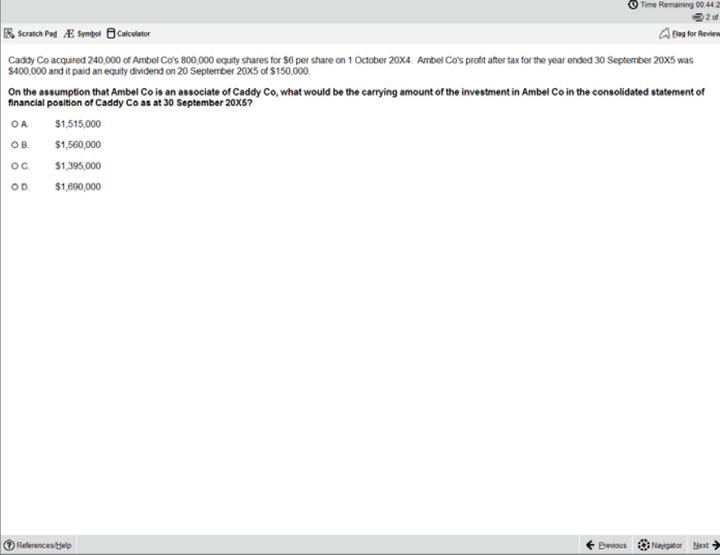
1 MULTIPLE CHOICE
Multiple choice questions are also used in paper exams. Students need to
choose one answer from a number of given options.
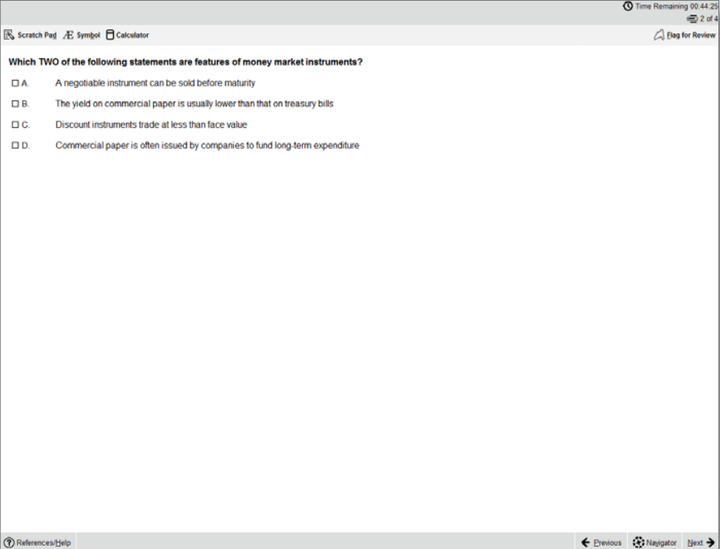
2 MULTIPLE RESPONSE
These are a kind of multiple choice question, except students need to select more than one answer from a number of given options. The question will specify how many answers need to be selected, but the system won’t stop students from selecting more answers than this. It’s important to read the question carefully because the Navigator and Item Review screens will show these questions as complete even if you have not provided a full answer.
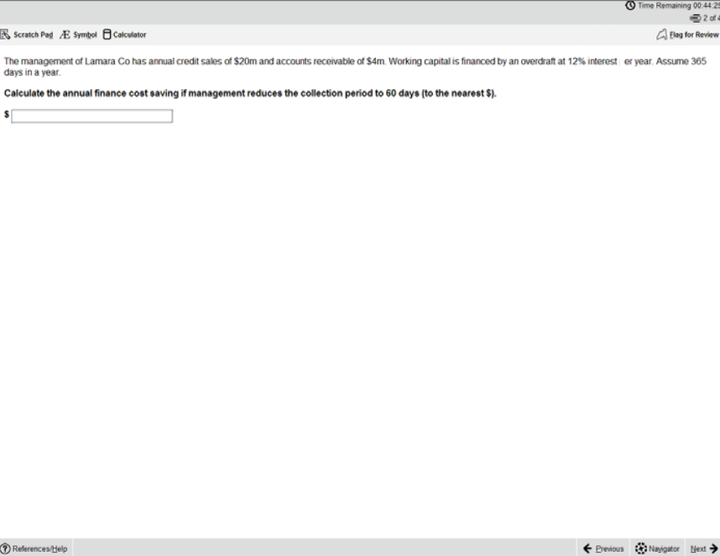
3 FILL IN THE BLANK
This question type requires students to type an answer into a box (usually numerical, but may be text). The unit of measurement will sit outside the box, and if there are specific rounding requirements these will be displayed.The only permitted characters for this
question type are:
• Numbers
• One full stop as a decimal point if required
• One minus symbol at the front of the figure if the answer is negative
For example: -10234.35
No other characters, including commas, are accepted.
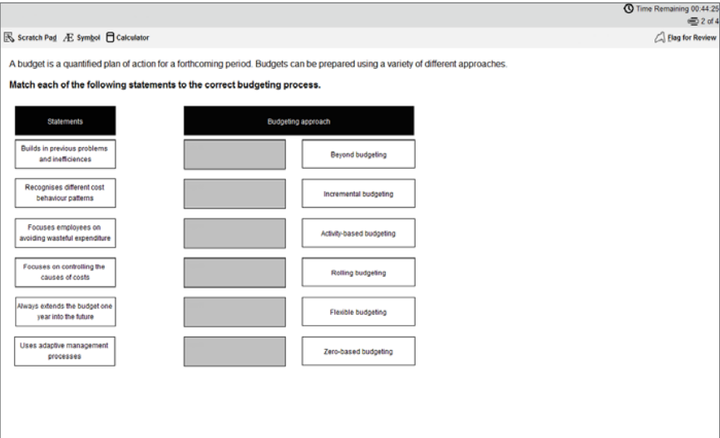
4 DRAG AND DROP
Drag and drop questions involve students dragging an answer and dropping it into place. Some questions could involve matching more than one answer to a response area and some questions may have more answer choices than response areas, which means not all available answer choices need to be used.
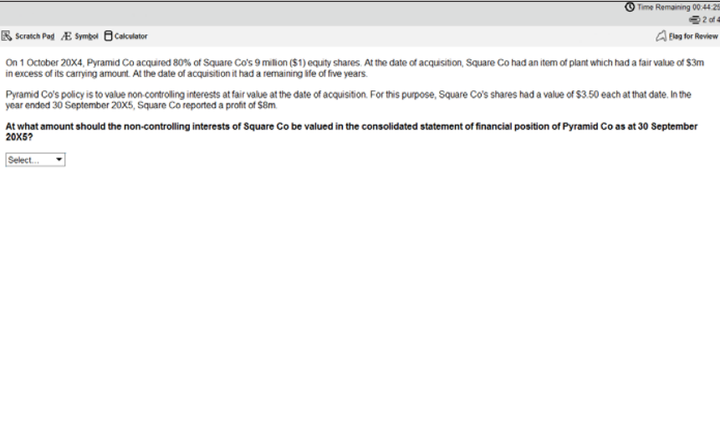
5 DROP DOWN LIST
This question type requires students to select one answer from a drop down list. Some of these questions may contain more than one drop down list and an answer has to be selected from each one.
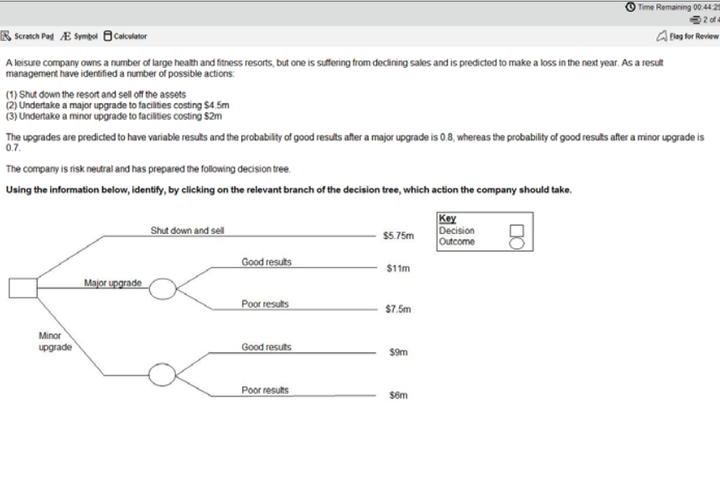
6 HOT SPOT
For hot spot questions, students are required to select one point on an image as their answer. When the cursor is hovered over the image, it will display as an “X”. To answer, place the X on the appropriate point on the diagram. The image will have been set so that as long as part of the X is touching the line that represents the correct answer, it will be marked correct, but not if it is also touching another possible answer.
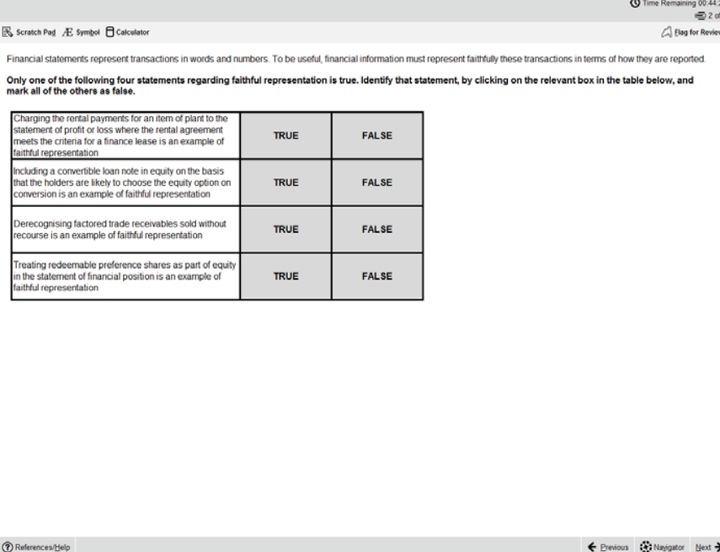
7 HOT AREA
These are similar to hot spot questions, but instead of selecting a specific point students are required to select one or more areas in an image. It’s important to read the question carefully because the Navigator and Item Review screens will show these questions as complete even if you have not provided a full answer.
Objective Test Case questions
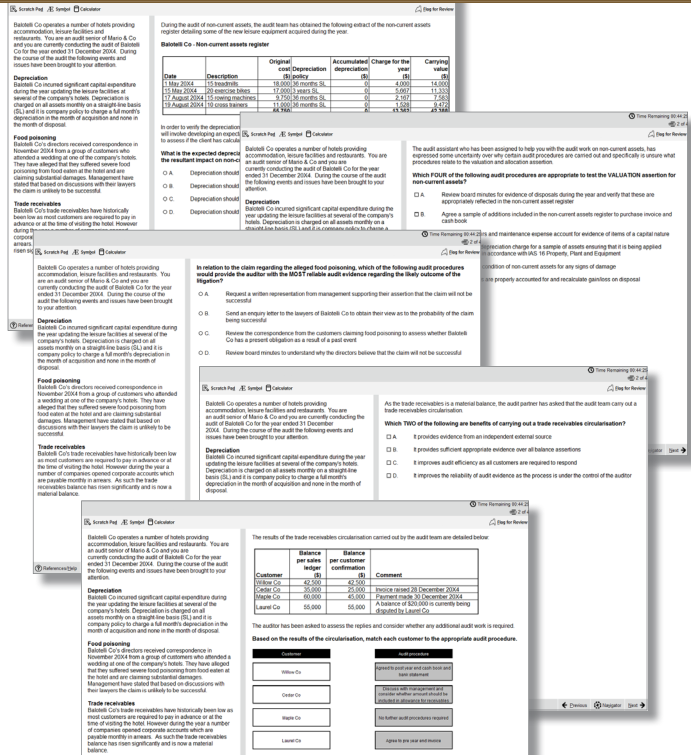
Each OT Case contains a group of five OT questions based around a single
scenario. These can be any combination of the single OT question types and they
are auto-marked in the same way as the single OT questions.
OT Cases are worth 10 marks (each of the five OTs within it are worth two marks, and
as with the OT questions described above, students will receive either two marks or
zero marks for those individual questions).
OT cases are written so that there are no dependencies between the individual
questions. So, if a student gets the first question wrong, this does not affect their
ability to get the other four correct.
The OT Case scenario remains on screen so students can see it while answering the
questions. However, a moveable splitter bar enables the student to focus on either
the scenario or the questions.
The following page shows an example of a single scenario with five OT questions.
Constructed response questions
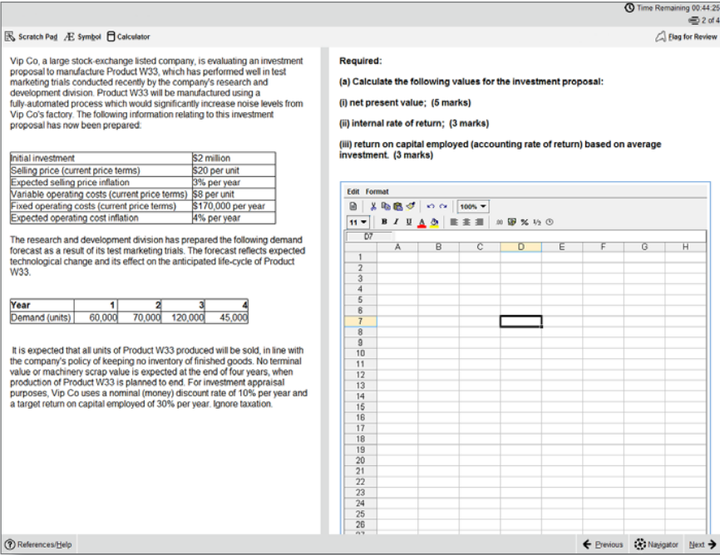
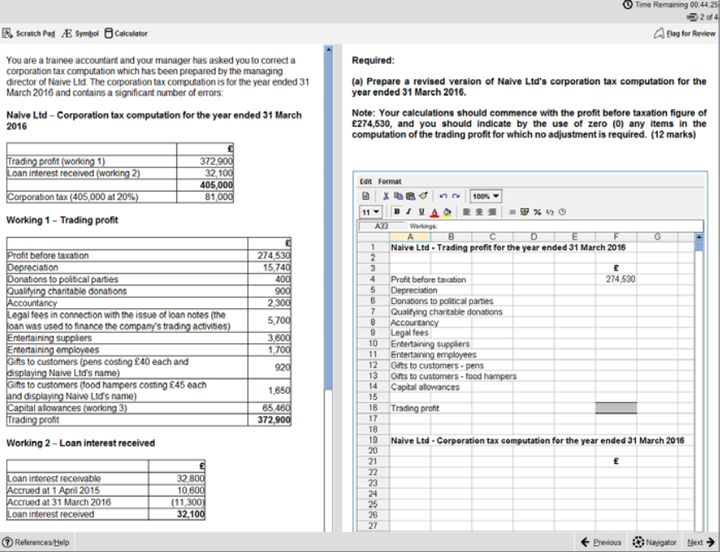
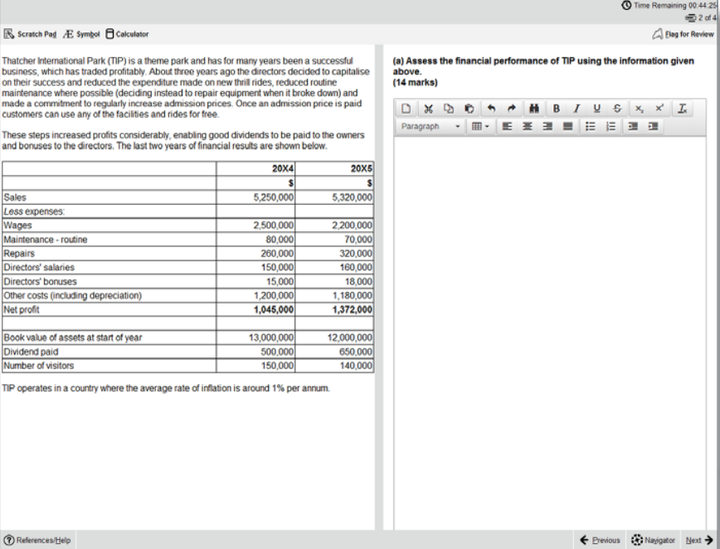
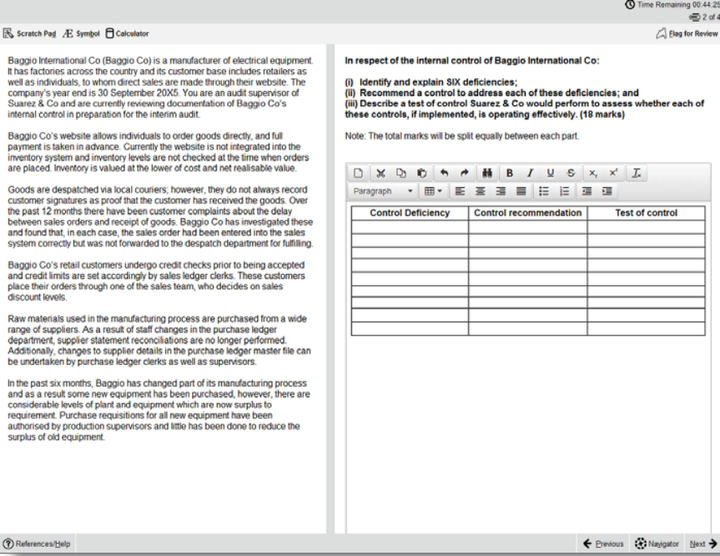
The biggest development with the new F5-F9 CBEs is in the expert marked section – our constructed response questions.
For these question types, students produce individual written and numerical answers which they insert into blank word
processing pages, blank spreadsheets, or pre-formatted templates. A number of standard word processing and spreadsheet
functions are available via the menu and tool bar for students to use when responding to the question.
Because students provide unique answers, either in their own words or by calculating and presenting numerical answers in
spreadsheets, this section will be marked by an expert. All workings and calculations will be viewed and assessed, just like in
paper exams – this means, for example, that if students use any formulae for the spreadsheet questions, markers will
see the formulae and not just the final answer, so they will understand how students have reached their answers.
This image shows an example of a question where students have to produce their answer in a blank spreadsheet.
This image shows an example of a question where students have to produce their answer in a pre-formatted spreadsheet.
This image shows an example of a question where students have to produce their answer in a blank word processing page.
This image shows an example of a question where students have to produce their answer in a pre-formatted word processing page.
For more information on Constructed Response questions, please refer to Appendix 1 – this is a guidance document which will be available to students during the exam through the‘help’ feature. It will also be available in the specimen exams.
Exam functionality explained
The new exams contain lots of useful functionality, explained below.
FLAG FOR REVIEW
When a student is on a question they can flag it for review. They can then revisit it
later in the exam.
NEXT AND PREVIOUS BUTTONS
Next and previous buttons allows students to navigate back and forth through the
exam questions.
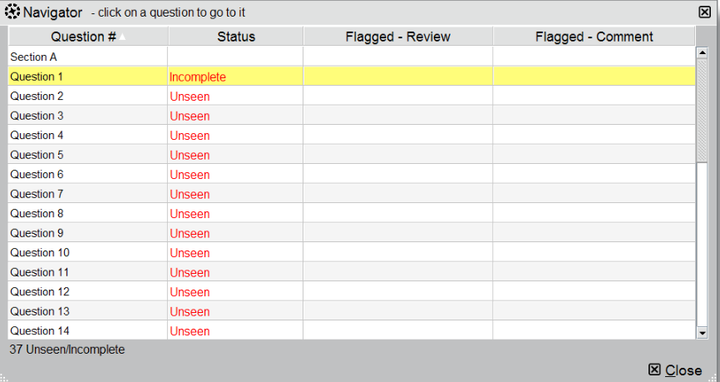
NAVIGATOR TOOL
This allows students to navigate to any question within the exam, instead of using the ‘next’ and ‘previous’ buttons. The navigator tool displays if a question has been
flagged for review, if a question has been answered, if a question is incomplete or if
a question has not been viewed by the student.
Status definitions:
• Complete – you have attempted the question. (Note that multiple response and
hot area questions will show as complete even if you have not answered in full.)
• Incomplete – you have viewed the question but not attempted it. (Note that
drag and drop and fill in the blank questions with more than one response area
will show as incomplete until you have answered in full.)
• Unseen – you have not viewed the question.
TIME AND EXAM PROGRESS
The question number and time remaining in the exam both appear on screen as default, but can be hidden by the student if they choose to. A message will display on screen when there are 15 minutes of the exam remaining.
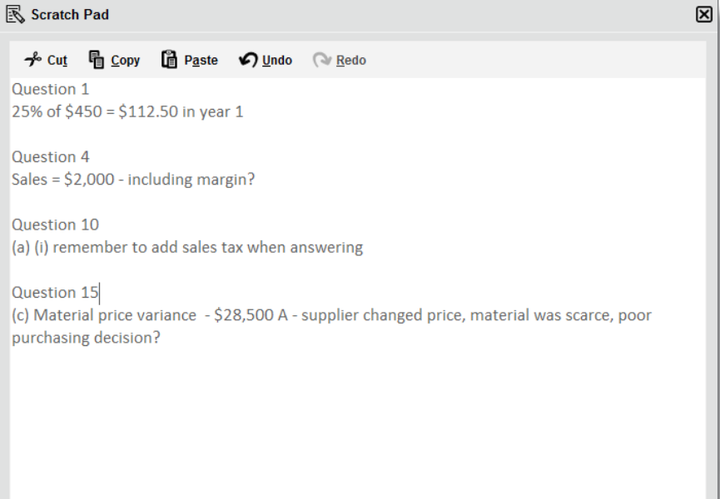
SCRATCH PAD
For students who like an area to do rough workings, there’s an on screen scratch pad for notes and calculations that will be available throughout the exam (please note students will also be given scrap paper at the exam centre if they want to jot any notes down that
way). The scratch pad retains all notes/ workings entered for all questions, and these are available to students for the duration of the exam. It’s really important to remember that what’s written in the scratch pad or on the paper notes won’t be marked! So, if a student has any notes or workings for the constructed response questions that they want the marker to see, they need to make sure they do these within the spreadsheet or word processing tools.
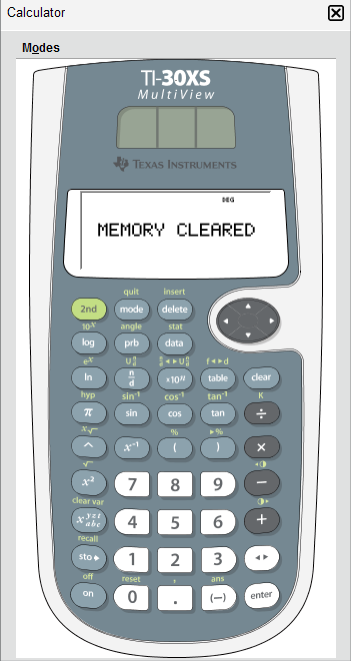
CALCULATOR
An on-screen calculator will be available, and students can choose between a standard or scientific calculator. Students are also allowed to bring their own calculator to the exam, provided it does not have the facility to store or display text.
HIGHLIGHT AND STRIKETHROUGH
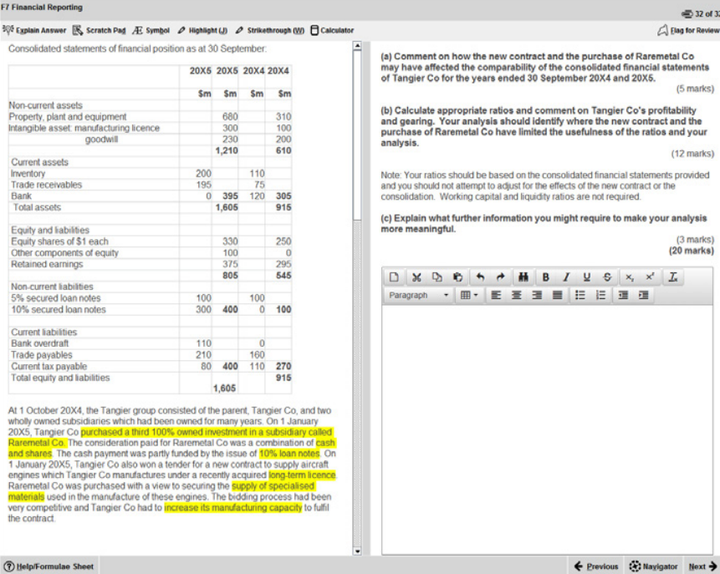
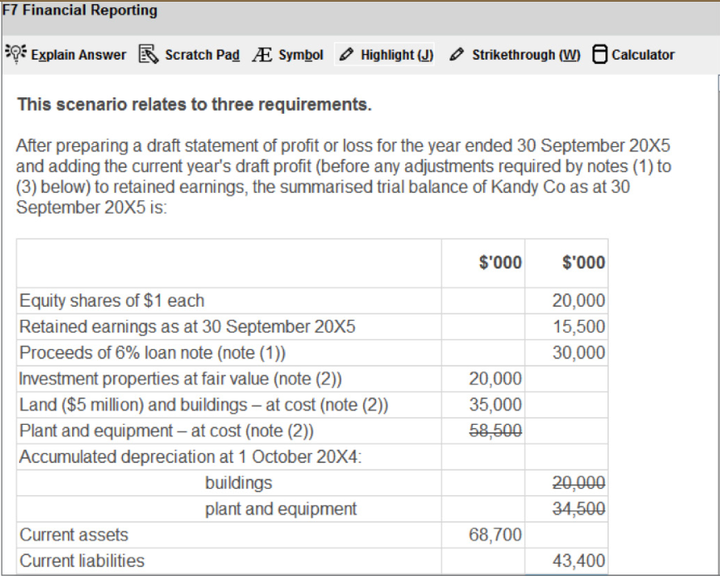
In the live exam (but not in the specimen exams) students can highlight or strikethrough parts of the question scenario, and this will remain on the scenario if the student moves between a number of requirements within the question. As you can see in the images
below, highlighting can be used to emphasise key elements of the scenario, and strikethrough can be used to indicate that you have dealt with, for example, a figure in the trial balance.
HELP FEATURE
This button will have a different label depending on the exam:
• F7 and F8 – Help
• F5 and F9 – Formulae Sheet/Help
• F6 – Tax Tables/Help
Relevant reference materials will be available in certain exams. F5 and F9 will include
a formulae sheet and F6 will include tax tables.
All of the exams include help on the CBE functionality, for example a recap of the
basic navigation and overview instructions shown at the start of the exam.
Spreadsheet formulae and tips give a list of the formulae that could be used within
the exam (please note students will need to type the appropriate formula into their
answers – shortcuts are not available). There are additional tips on formatting and
functionality. Please see Appendix 1 for further detail.
ITEM REVIEW SCREEN
The item review screen is shown at the end of the exam and is similar to the
navigator tool. So, it displays if a question has been flagged for review, if a question
has been answered, if a question is incomplete or if a question has not been viewed
by the student. Students can also end their exam from this screen.
SCROLLING
If a question shows a scroll bar, students must use this to expose the full area
before they can progress to the next question. This ensures they don’t miss any
information.
SPLITTER BAR
Some questions in the exams have the question and answer sections of the screen
divided by a splitter bar, which may be horizontal or vertical. Students can drag this
splitter bar across the screen to give them more or less space for the question or
answer section as desired.


【整理版】ACCA各科目历年真题
真题高频考点,刷题全靠这份资料

acca全科学习思维导图
梳理核心考点,一图看懂全部章节

2023年acca考纲解析
覆盖科目重难点,备考按照计划走


- acca考试怎么搭配科目?
-
建议优先选择相关联的科目进行搭配报考,这样可以提高备考效率,减轻备考压力,1、F1-F4:为随时机考科目,难度较低,这里可以自行随意选择考试顺序。2、F5-F9:如果你的工作的和财务会计或者审计有关、或者你比较擅长财务和审计的话,推荐先考F7和F8。你可以选择一起考ACCA考试科目F7和F8或者先考F7(8)再考F8(7),这就要取决你一次想考几门。3、P阶段:选修科目中,建议企业首选AFM!第二部分科目进行选择,如果AA和SBR掌握学生更好,可以通过选择AAA,如果SBL掌握的好,可以自己选择APM。
- acca一共几门几年考完?
-
acca一共有15门考试科目,其中有必修科目和选修科目,考生需要考完13门科目才能拿下证书。
- acca一年考几次?
-
acca一年有4次考试,分别是3月、6月、9月和12月,分季机考科目是采取的这类四个考季的模式,而随时机考则是没有这方面的时间规定限制,可以随报随考。
- acca的含金量如何?
-
ACCA证书的含金量是比较高的,从就业、能力提升、全球认可等角度来说,都是比较有优势的证书,其含金量主要表现在以下几个方面:1、国际化,认可度高;2、岗位多,就业前景好;3、缺口大,人才激励。
Sdanvi
高顿ACCA全学科负责人
- 教学特色
- 自创“少女三大法则”和“二阶学习法”
- 教学资历
- 两年内高分通过ACCA考试,ACCA业界学霸型讲师
- 客户评价
- 帮助学生快速理解ACCA的知识点,是ACCA学习不可错过的宝藏博主

- 老师好,考出ACCA的难度相当于考进什么大学?
- 老师好,ACCA考试怎样备考(越详细越好)?
- 老师好,38岁才开始考ACCA会不会太迟?
- 老师好,ACCA通过率是多少?
- 老师好,有了ACCA证后好找工作吗?
Perry
高顿acca明星讲师
- 学历背景
- 复旦-麻省理工国际工商管理硕士
- 教学资历
- 曾就职于四大、世界500强
- 客户评价
- ACCA业界学霸型讲师

- 老师好,acca如果不去考会怎么样?
- 老师好,acca难度有多大?
- 老师好,acca一年可以考多少门?
- 老师好,acca考试科目几年考完?
- 老师好,acca工资一般是多少钱?
Dora
高顿acca明星讲师
- 学历背景
- 英国布里斯托优秀硕士生
- 教学资历
- 多年普华永道金融组审计师经验
- 客户评价
- 知性又美丽,温柔大姐姐

- 老师好,acca持证工资待遇如何?
- 老师好,35岁考acca有意义吗?
- 老师好,考过acca能干嘛?
- 老师好,考完acca可以做什么工作?
- 老师好,acca年薪一般多少?
-
ACCA机考怎么预约?ACCA机考考试时间是多久? 2023-10-30
-
ACCA考试中P阶段是机考还是笔试?ACCA考试P阶段考试顺序怎么安排? 2023-10-30

-
ACCA一年最多考几门?考ACCA一般多久可以拿证? 2023-10-30
-
ACCA考试时间是什么时候?ACCA考试流程具体有哪些? 2023-10-30
-
ACCA学习教材在哪买?ACCA教材有中文版卖吗? 2023-10-30

-
acca12月季考常规报名截止时间:10月31日! 2023-10-27

-
ACCA 2023全国大学生财智精英挑战赛报名启动! 2023-10-20

-
AAA必考知识点解析(审计程序) 2023-10-16

-
AAA必考知识点解析(风险评估) 2023-10-16
-
四大和八大差距究竟在哪里?看完这篇文章你就懂了! 2023-10-16

-
ACCA证书含金量高不高?看完这篇文让你秒懂! 2023-10-16

-
2024年acca考试难度大吗?一篇文章介绍完! 2023-10-16

-
英语不好该学ACCA吗?学姐分析来了! 2023-10-16

-
本科大一怎么准备进入四大?点击查看详细情况! 2023-10-15

-
ACCA和考研如何选择?点击查看分析! 2023-10-14





-
ACCA和考研如何选择?点击查看分析! 2023-10-14
-
ACCA奖学金是什么?一文解读! 2023-10-13
-
非专业学生如何从事会计类专业?职业发展必看! 2023-10-13

-
ACCA在国外地位如何?解析ACCA证书的国际趋势! 2023-10-13

-
ACCA与出国读金融有关系吗?学姐解读来了! 2023-10-13
-
学ACCA对工作有用吗?ACCA就业解析! 2023-10-13

-
如何自学ACCA?学姐攻略来了! 2023-10-13
-
ACCA F9与P4的区别与联系?一文了解详情! 2023-10-12
-
如何进入四大的咨询部门?学姐告诉你! 2023-10-12

-
想进四大,除了考CPA,还有ACCA这个途径! 2023-10-12

-
怎么进四大会计师事务所?这篇文章教会你! 2023-10-12

-
学ACCA 的你们后来怎么样了?ACCA就业发展解析! 2023-10-12
-
ACCA难在哪里?解决这两点,轻松出坑ACCA! 2023-10-12

-
ACCA加速计划详细介绍,学姐手把手教你申请! 2023-10-11

-
澳洲ACCA免考情况,速来查看加速计划! 2023-10-11